
Meet MWM, MTM and SMS Blast

Welcome to better messaging.

Organize accounts and conversations.
Choose your messaging workspace.

Explore products
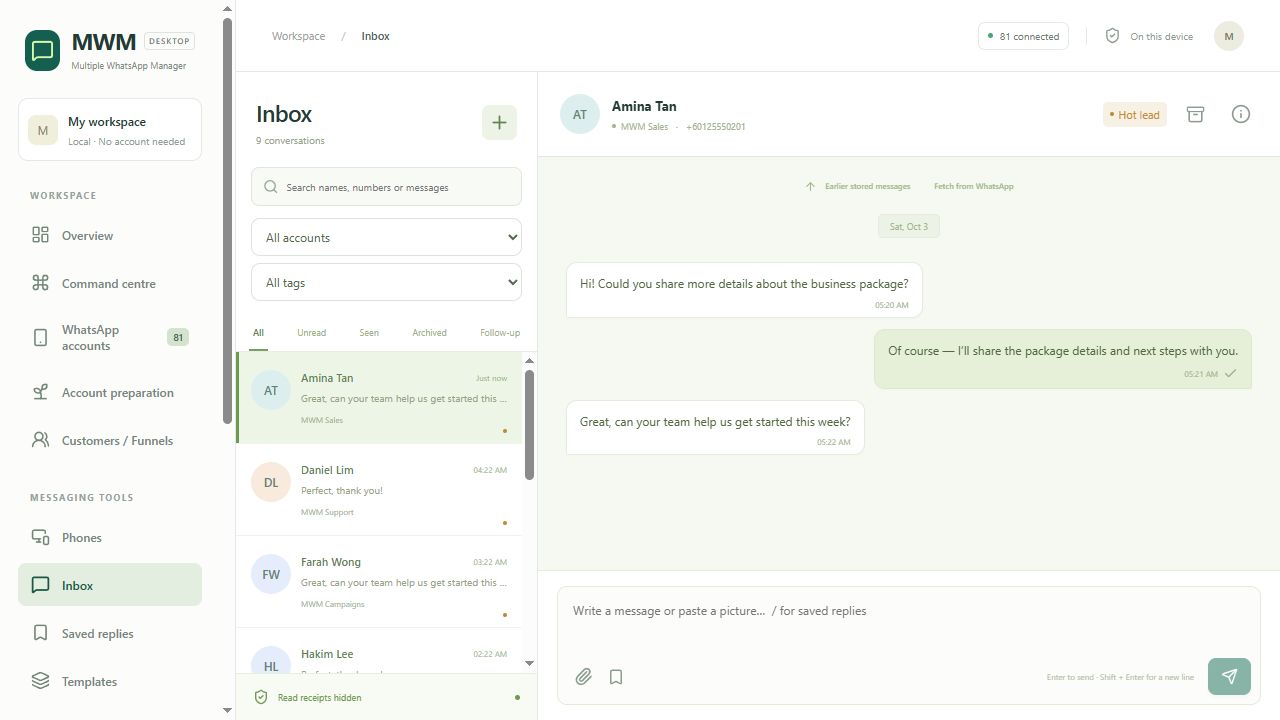
View the MWM interface
A product for the way you work
WhatsAppTelegramSMSWindowsLocal records
Product channels and operating environment, not customer endorsements.

A workspace for your everyday work. Less switching between accounts. Clearer conversations. The next step, always in view.

Every conversation, in view. Bring your WhatsApp accounts into one inbox, with tags and follow-ups alongside the message.

MWM / Windows workspace
Real interface · isolated demo dataClick to enlarge

Stay close to the conversation.

Filter by account, tag or conversation and get back to the customer with less searching.

Keep useful answers ready.

Saved replies help you reuse the wording you have already checked.

Prepare first. Send with a plan. Import your list, check personalization and preview the message before you start a campaign.

Campaign preparationIllustrative workflow
Start
Import recipients

Use your own recipient list.

Ready to review
Review
Check variables

Check names and missing values.

Ready to review
Review
Preview your message

Read the recipient preview.

Ready to review
Review
Confirm before sending

Test with a designated recipient.

Ready to review

An illustrated preparation sequence. This website does not send messages.

Personal without guesswork.

Review name variables, duplicates and recipient data before the full broadcast.

Buttons, with a test first.

MWM supports experimental website, call and quick-reply buttons. Recipient compatibility needs a designated test.

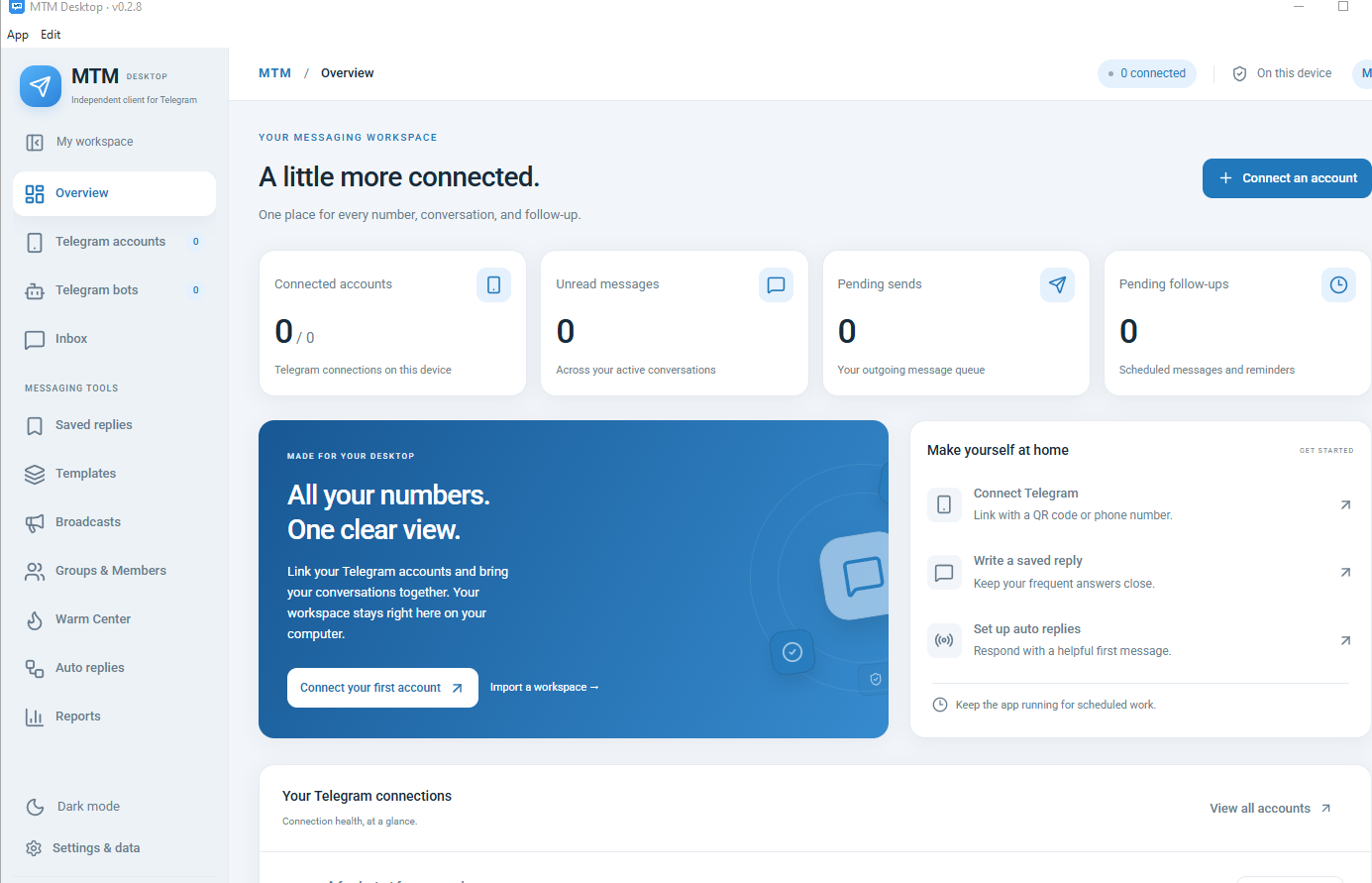
Your Telegram operations, together. Accounts and bots, member invitations, campaigns and replies in a dedicated MTM workspace.

MTM / Windows workspace
Real interface · isolated demo dataClick to enlarge

Make the invitation deliberate.

Review group permissions and member privacy before creating an invitation task.

Make every message yours.

Prepare recipient imports, variables and media, then inspect the campaign preview.

The next step, already organized. Saved replies, tags and scheduled follow-ups help you keep the conversation moving.

SC
Sample contactIllustrative customer record
Follow upProduct enquiry
Check the customer’s next step

Keep the follow-up beside the conversation.

Saved reply · example

Thanks for your enquiry. Which channel does your team work with most?

See the steps in MWM

Scheduled tasks require the app running, computer awake and account connected.

Your records. Your workspace. Keep customer context locally, with backup and restore for the records you manage.

Customer recordsIllustrative data
ContactChannelTagNext step
ASample customer AWhatsAppEnquiryConfirm product fit
BSample customer BWhatsAppFollow upReview requirements
CSample customer CWhatsAppDemoWalk through the workspace
DSample customer DWhatsAppSaved replyAnswer a question

Keep the context.

Customer details and tags help you understand a conversation before replying.

Make backup part of the routine.

Use local backup and restore. Check the result before relying on a backup.

Start with the real workflow. Choose your channel. Explore the interface. See what the product can do before you decide.

See the workflow
MWM / Windows workspace
Real interface · isolated demo dataClick to enlarge

Practical tools. Clear next steps.

Your messaging workspace.

A clearer inbox.

Accounts and conversations, organized.

A prepared campaign.

Check the content before sending.

A useful guide.

Separate instructions for each product.

A visible next step.

Keep follow-ups close to the conversation.

Records you retain.

Local data with backup and restore.

The right tool for your channel. One collection. Three distinct products.

See the collection
MWM

Conversations, broadcasts and follow-ups, together.

Explore MWM

Your accounts. Your conversations.

Choose WhatsApp with MWM or Telegram with MTM. Each product has its own workspace and guide.

Explore the products

MWM. MTM. SMS.
Know your product before you begin.

Open the help center
ANYT99 Marketing Lab
“Practical marketing tools. A clearer way to manage your everyday conversations.”

ANYT99 Marketing Lab · Our approach

Find your fit. Review the product, the platform and the current sales status.

3Distinct products
2Real workspace previews
EN / 中Website languages
LocalRecords in MWM & MTM

See the work, not just the feature list. Three products. Three different places to start.

See all products

Your WhatsApp accounts. One Windows workspace.

Manage multiple WhatsApp accounts, organize conversations and prepare personalized broadcasts from one local Windows workspace.

Explore MWM
MWM actual interface, isolated demo data

Clear information, at every step. Know what is ready and what is still being prepared.

View all

Get to know your workspace.Practical steps, in the product’s own guide.

Browse the guides

Better messaging starts here.

MWM — real interface with isolated demonstration data

Actual software interface · isolated demonstration data